Increasing privacy sentiment with trust signals
Key skills involved: Content strategy, auditing existing signals on Meta apps, UXR
Overview
Most WhatsApp scams and unwanted messages start the same way: a message from someone the person doesn't know, like a fake recruiter, investor or a stranger building trust before asking for money or personal details. WhatsApp's guidance asks people to spot warning signs and verify unknown senders, but in the moment they have little to go on beyond the message itself.
I partnered with a product designer in Germany from the integrity team to design the cues people see when a stranger messages them for the first time. These cues help people decide easily whether to trust the message sender or not engage, report or block.
Challenge and scope
How Might We… help someone decide whether to trust a first message from a stranger instantly, within the message and how should this feel if there’s no phone number displayed, only a username?
Phone numbers have long doubled as a scam-detection signal: the country code alone can hint at whether a message is coming from a real contact or a scammer. Usernames let people keep their number private, which is a privacy win, but it also takes away a cue people use to protect themselves.
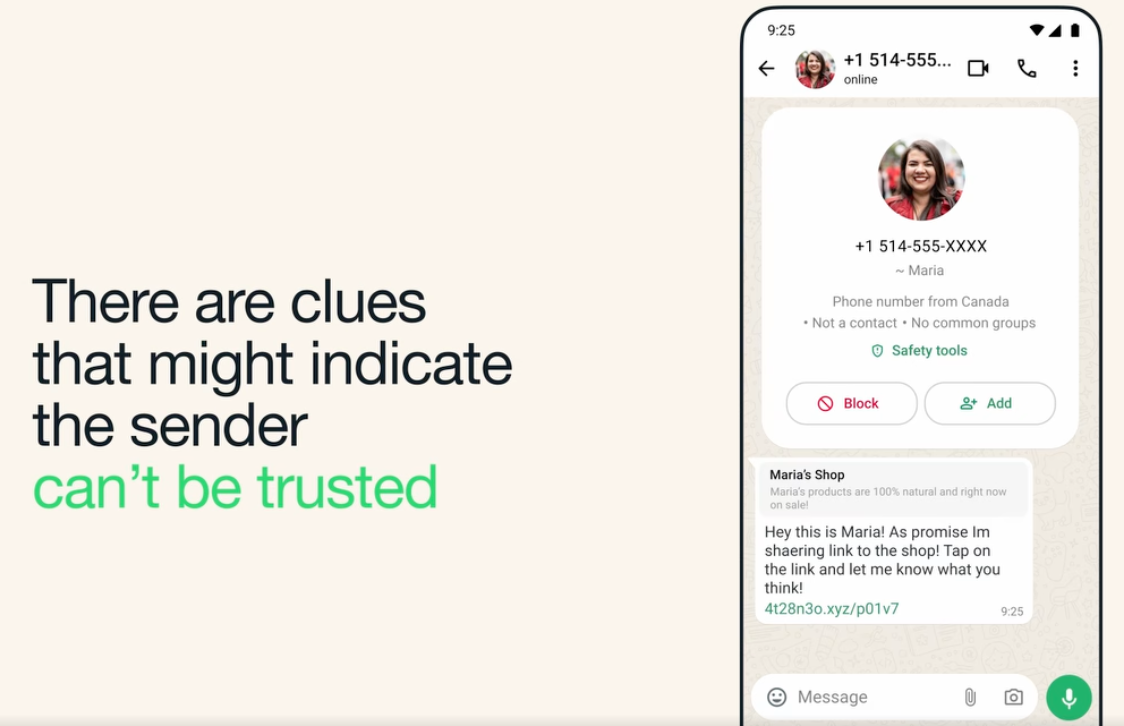
Case Study: Designing trust signals in first message experiences
Goals:
1. Give people enough context to judge a first message from a stranger quickly and an easy way to act on it, without adding friction for the people they do know.
2. Use what information WhatsApp already collects as signals, making sure it’s legally okay to display.
3. Align with WhatsApp leads, with engineering on what signals we collect and with policy and legal on how to display that info and what else we could display.
How it works
The scenario: Someone you’ve never interacted with sends you a message. You might see a phone number or only a username. Is this person safe to talk to?
In a 1:1 chat, the first message from a stranger comes with an intro card that answers that question at a glance:
Who they say they are. The username (@Maria1975) or phone number is displayed, and the profile name appears with a tilde (~ Maria) meaning it might be Maria. This also means it’s a name the person chose for themselves, not one you saved.
Where they’re from. “Phone number from India” keeps the country signal people already use, without revealing the number.
Whether you know them. “Not a contact” and “No common groups” tell you there is no shared history.
What you can do. A “Safety tools” link opens ways to block and report, and Block and Add buttons sit right on the card.
In group chats, members who aren’t saved contacts show the same tilde name with their username beside it (~ Amy @WanderlustAmy12), so you can tell who is a stranger without leaving the conversation.
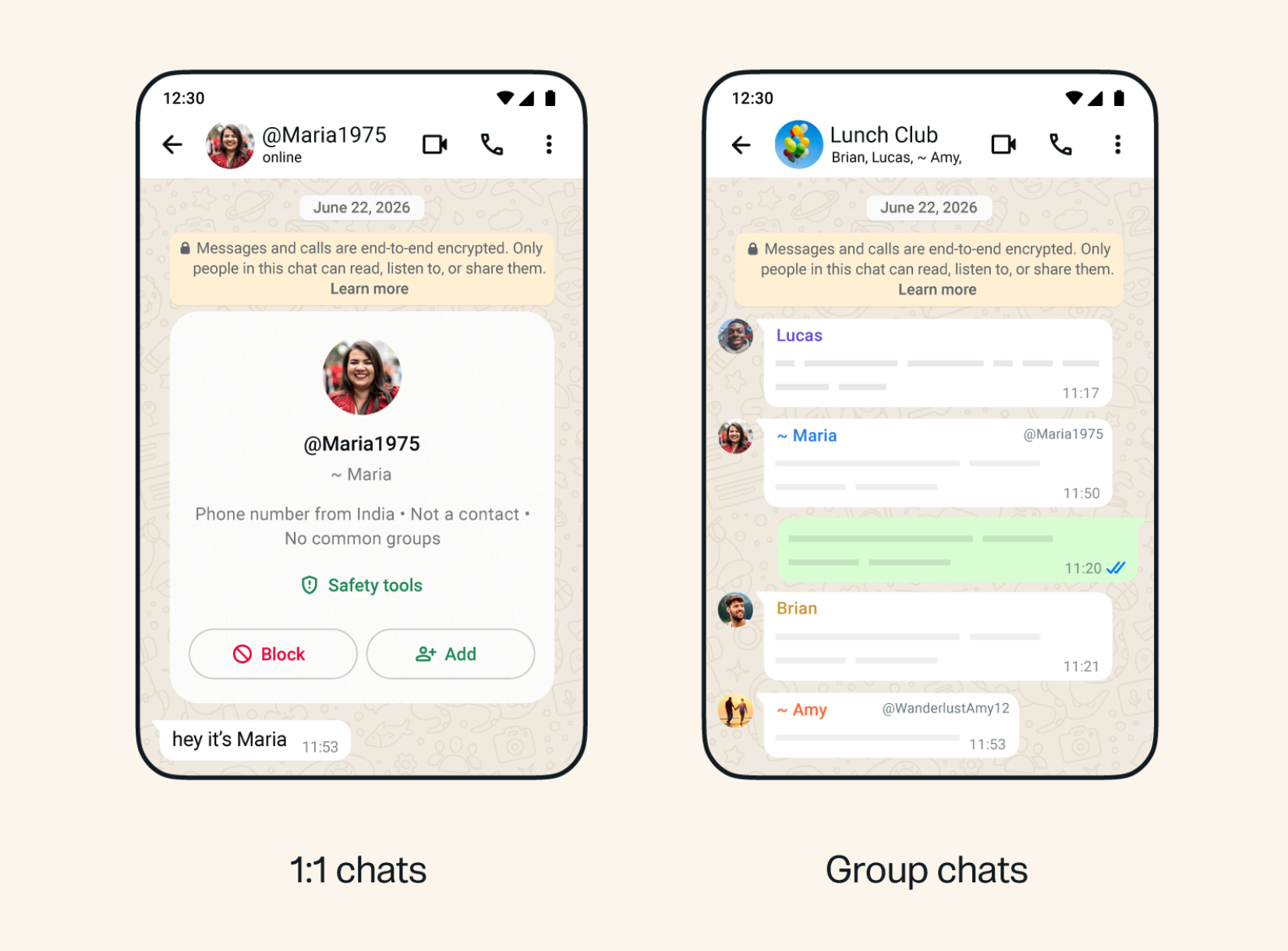
First message card from a sender with only a username
Strategy and process
Rather than start from a blank page, I started by looking at what already existed. I ran an audit of how other Meta apps displayed this kind of information about a sender, and found that Messenger already had a very similar pattern. I chose to build on what was already live across the family of apps instead of creating something from scratch, then adapted it for WhatsApp.
Audit — Reviewed how other Meta apps already surfaced sender context to someone receiving a message from a stranger.
Reuse — Found that Messenger had something very similar, and borrowed from existing family of apps patterns where they fit.
Use data we already had — Mapped each cue to information WhatsApp already collected, so nothing new had to be gathered from people. The country code told us where a sender is located. We knew whether the sender was a saved contact and whether you shared any groups. Showing these cues when a message came from a stranger, gave immediate clues on how to move forward.
Align — I wanted to show more signals but learned we don’t collect too much data on users because of privacy reasons.
Working principles
Build on what exists. If another Meta app already solves part of the problem, start there instead of reinventing it. It is faster, and it keeps the experience familiar across the family of apps.
Use signals we already have. Show data WhatsApp already collects, like country code, contact status, and shared groups, instead of asking people for anything new. The cues come from information that is already reliable.
Give cues, not verdicts. The card never tells someone a sender is safe or unsafe. It shows the facts and lets the person decide whether to trust them.
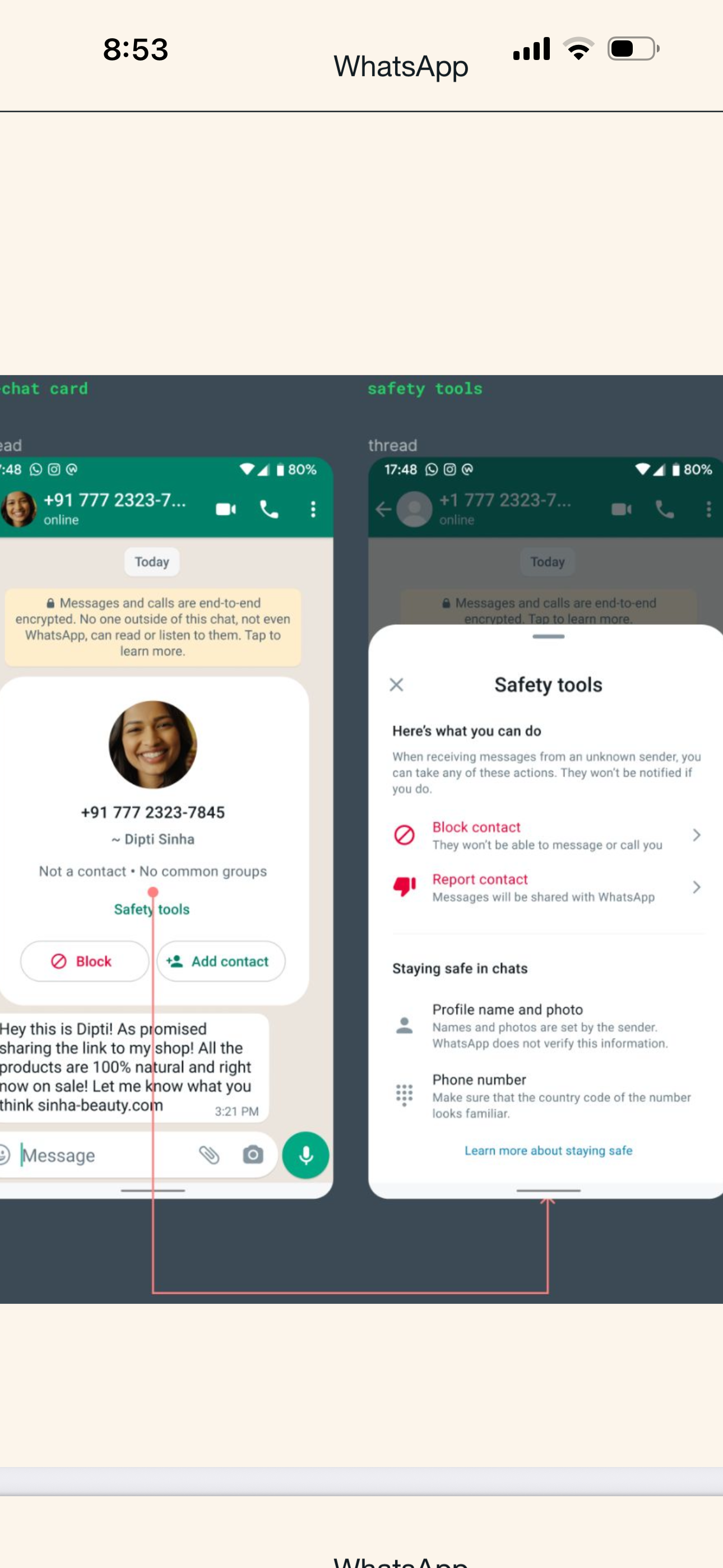
I created the content and hierarchy for the trust signals and safety tools cards. This provided useful information in a first message from a stranger and increased the feeling of privacy on the app.
Decisions and trade-offs
WhatsApp does know how long an account has existed. While spam accounts are most likely created within a few months of spamming strangers, I decided this could be a confusing signal since some users could be genuine and new to the app. We scrapped this option for version 1.
Impact
The trust signals card significantly increased privacy sentiment on WhatsApp within first year of launch, a metric that has historically been difficult to shift. Showing people cues about who is messaging them, using data we already had, made the app feel safer to use.